When the bundle goes first
Why a month of data disappears in two weeks, and which part of it you can cut without changing how you use your phone.
A data bundle that runs out early is almost never the result of you using your phone too much. It is usually a handful of apps spending steadily while the phone is in your pocket, and the reason it feels mysterious is that this spending is genuinely invisible. Nothing tells you it happened.
The arithmetic nobody does
Divide the bundle by the days in the cycle. That is your daily allowance, and seeing it written down changes how the problem looks:
| Bundle | Per day (30 days) |
|---|---|
| 3 GB | about 100 MB |
| 5 GB | about 170 MB |
| 10 GB | about 333 MB |
| 30 GB | about 1 GB |
Now compare that with what a single misbehaving app can spend. A game syncing constantly, a social app preloading video you never watch, or a store app downloading its own updates over mobile data can each run to hundreds of megabytes a month on their own. Two or three of those and a 5 GB bundle is gone before you have watched anything deliberately.
The two kinds of usage, and only one is yours
Foreground is data you spent. You opened the app and used it. Cutting this means using your phone less, which is not really a solution.
Background is data the app spent on its own. Cutting this costs you nothing you would notice, and on most phones it is a large share of the total.
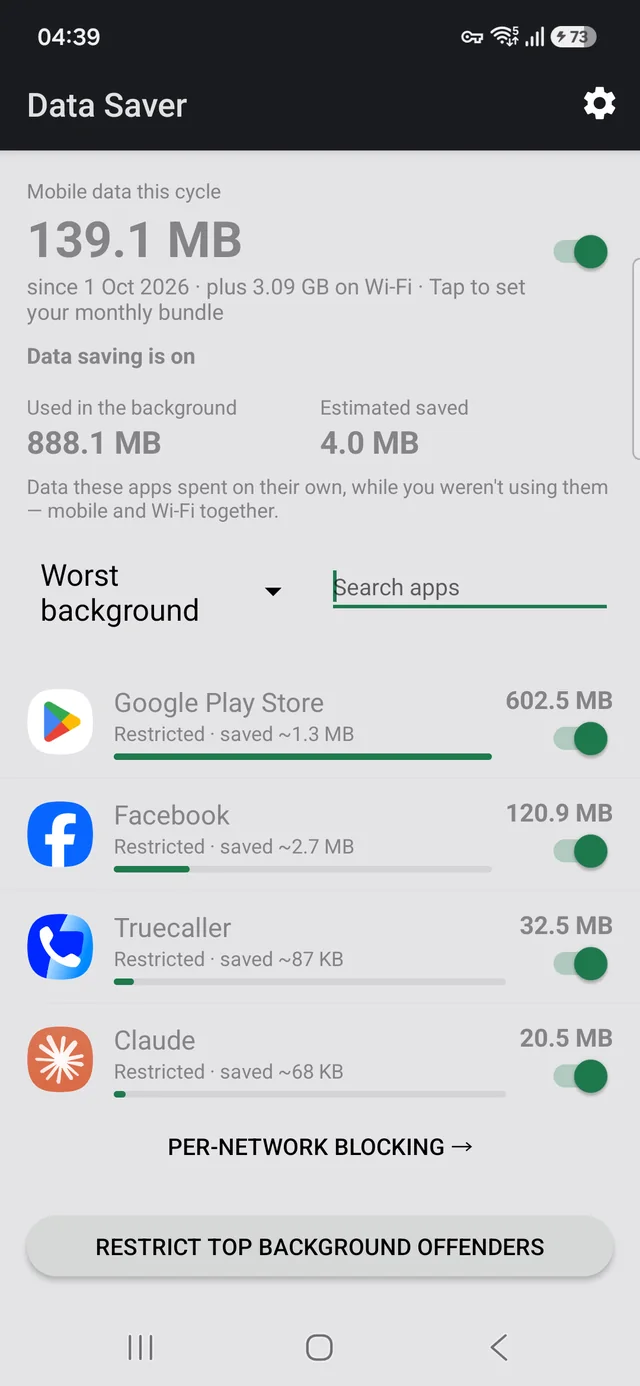
Android records both figures separately and will show you them per app. Most people never look, because the split is three screens deep and the billing cycle defaults to the wrong dates. Here is how to find it.
What actually helps
- Find the top three, not all of them. Usage is heavily skewed. Dealing with the worst three apps usually recovers most of what you are losing, and leaves the rest of your phone untouched.
- Separate Wi-Fi from mobile. An app that is harmless on Wi-Fi can be expensive on a bundle. Only one of the two costs you money, so block by network rather than outright.
- Turn off background data for the offenders. How to do that, including the one setting that will silence every notification on your phone if you get it wrong.
- Check store app auto-updates. On a metered connection this alone can be gigabytes, and it is a single setting in the Play Store.
Beware the advice to just switch everything off. Restricting Google Play Services stops every notification on the phone — messages, mail, calls, two-factor codes — while the apps themselves still open normally, so the cause is almost impossible to guess later.
Related
- Samsung Max was discontinued — what to clear off your phone, and which parts of it still need replacing
- Block an app on mobile data but keep it on Wi-Fi — the per-network switch Android never shipped
- Why the Play Store eats your mobile data — usually the single biggest offender, and a one-line fix
Knowing where you stand mid-cycle
The harder problem is not the first day of the bundle. It is day eleven, when you want to know whether you are ahead or behind and how long what is left has to last.
Data Saver was built for that: enter the bundle and it shows what remains and how many days it has to cover, ranks every app by what it spent this cycle with the foreground and background split on the same line, and lets you restrict an app per network from that same row.
It has no INTERNET permission. It is absent from the
manifest, so Android will not let the app open a network connection at all. The figures
come from counters Android already keeps on your device. The source is public.
Free, no ads, works offline. Requires Android 7.0 or later.