Blocked on mobile, fine on Wi-Fi
The one thing people reasonably expect Android to do with app data, and the one thing it does not.
The request is simple enough. One app — a store, a game, a social app — is expensive, and you would like it to carry on working normally at home and stop touching your bundle when you leave. Allowed on Wi-Fi. Blocked on mobile.
Android has no setting for that. It is worth being clear about it up front, because a lot of pages imply otherwise and send people hunting through Settings for a switch that was never there.
What the built-in settings really do
There are three controls that look like they might be the answer. None of them is.
1. Background data (per app)
Settings → Network & internet → App data usage → tap the app → Background data.
This is about when, not which network. It stops the app spending while you are not in it. Open the app and it uses mobile data as freely as before. On Wi-Fi it changes nothing.
Genuinely useful — it is the single most effective built-in control, and for a lot of apps it solves the real problem. It just isn't a per-network switch. More on what it does and the one thing not to restrict.
2. Android's own Data Saver
Mobile-data-only, which sounds promising, but it applies to every app at once and only to background traffic. You then add exceptions one by one. It is an emergency brake for the end of a bundle, not a per-app rule.
3. Metered Wi-Fi
You can mark a Wi-Fi network as metered so apps treat it like mobile data. That is the opposite direction — it restricts Wi-Fi, it cannot free it.
Why the gap exists. Android's model is "is this connection expensive?", not "which app may use which connection". Apps are expected to check whether the network is metered and behave. Many do not, and nothing makes them.
What a real per-network switch requires
Deciding which apps may reach the network is a privileged thing to do. Without root there
is exactly one API for it: VpnService. That is why every no-root firewall or
blocker on Android asks for VPN permission, and why the key icon appears in your status bar.
It is worth understanding, because the permission sounds far more invasive than what it is being used for here.
A blocker does not have to route your traffic anywhere.
VpnService can be used in package-list mode: the app names which packages
are allowed through and never reads the tunnel. No packets are forwarded, inspected,
captured or sent to a server. The connection exists only so the system has something to
point the blocked apps at.
That is a real distinction, not a reassuring phrase. A traffic-compressing or privacy VPN genuinely does route everything you do through someone else's servers. A package-list blocker cannot — there is nowhere for it to go.
The way to tell the difference is the INTERNET permission. An app without
it cannot open a network connection at all, whatever its code says.
The trade-off worth knowing before you install anything
Android allows one active VPN at a time. Anything using
VpnService to block apps therefore occupies that slot, and cannot run alongside
an actual VPN. If you need an always-on VPN, no no-root blocker will work for you, and that
is a hard limit rather than a shortcoming of any particular app.
Several open-source apps do this, with different aims — some are full firewalls with per-connection rules, some add DNS filtering. If you want exhaustive control, look at those.
What we make
Data Saver takes the narrow version of the problem: see what each app spent, and block the expensive ones per network, from the same row.
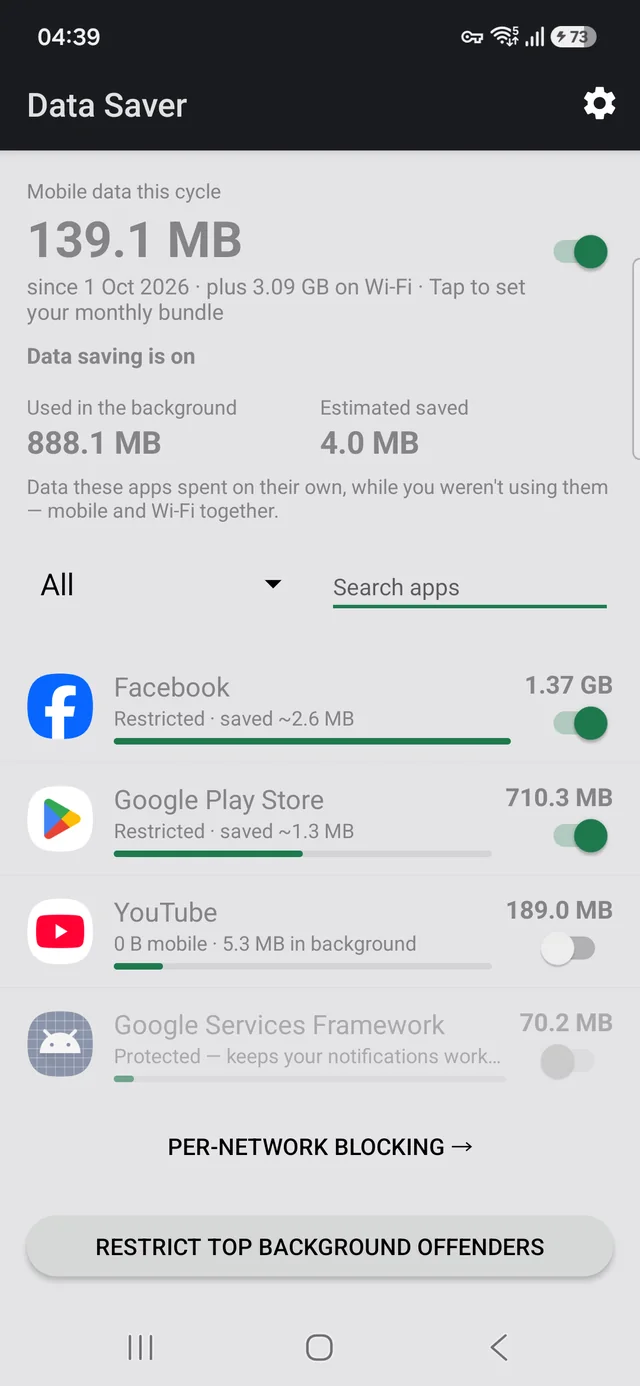
It has no INTERNET permission. The permission is absent
from the manifest, so Android will not let it open a socket — it could not send your
traffic anywhere if it tried. It uses VpnService in package-list mode with no
packet forwarding, exactly as described above. No accounts, no analytics, no servers, no
ads, and the source is public, so this is checkable rather than a promise.
Free, no ads, works offline. Requires Android 7.0 or later.
Related
- Which app is using your mobile data — find the culprit before you block anything
- Stopping background data — the three built-in ways, and the switch that silences every notification
- Why your bundle runs out early — the arithmetic, and which half of your usage is worth cutting
- Why the Play Store eats your mobile data — usually the single biggest offender, and a one-line fix